6W01 / 06
Bias
Above the 50-period average the bias is long. Below it, short.
I day trade US equities with a Wyckoff-based process across six timeframes. Price and volume lead the read, moving averages mark where price pauses, and I publish the whole process, losing weeks included.
Market Read
I trade one setup: the pause after an impulse. Price stops on the 5, 10 or 20-period moving average, builds a re-accumulation, and continues when a larger candle breaks out on volume. Hover or tap the chart to read each phase.
Method
Every trade is read top down. Price and volume lead, and moving averages are used only as reference levels where price pauses. The higher timeframe sets the context, and a lower one only gets a say when it agrees.
Above the 50-period average the bias is long. Below it, short.
Price in a trend, with a clean and strong mark-up.
A clean pause on the 5 and 10, or on the 20-period average.
A large candle breaking with momentum, often at the open, shows the strength to carry the move.
A second pause on the averages after a strong impulse, to anticipate the daily move with better risk-reward.
The entry is taken on the tight accumulation that follows the 6-minute re-accumulation.
↓ Context flows down. Permission never flows up.
Strategy
One discretionary strategy, applied to liquid US equities and to indices, metals and commodities. Both are currently in funded evaluations, run on the same read and the same risk policy.
Discretionary day trading on price and volume, read top down across six timeframes. Continuation after a re-accumulation, in trending markets only.
Past performance is not indicative of future results.
The same read applied to stock indices, metals and commodities, traded inside a funded evaluation program.
Results are published with the program's own confirmation.
Live Trades
Every trade is posted on X at the moment it is taken. These are the most recent, with the result in R once closed.
Risk Framework
These limits apply to every account I trade. They are written as policy, not as guidelines, and a trade that breaks one is logged as a mistake whatever it returns.
| Parameter | Limit | How it is applied |
|---|---|---|
| Risk per trade | 0.25% of equity | Sized on the current balance, updated after every trade, so risk compounds with the account. |
| Stop management | Breakeven at 1R | Once a trade reaches one times its risk, the stop moves to the entry price. |
| Concurrent positions | Two, typically | Margin rarely allows more than two open trades at the same time. |
| Liquidity filter | 1M shares per session | Only names trading at least one million shares in the session, with a clean one-minute chart and no gaps between bars. |
| Setup | One structure | Continuation after a re-accumulation. No entry while price is still inside the range. |
| Market context | Trending markets only | No trades when the higher timeframes are not trending. A trade taken out of context is logged as a mistake. |
| Capacity | Timeframe scales with size | When liquidity becomes a constraint, entries move from the one-minute to the 65-minute and then the daily chart, on names trading 60 to 70 million shares a day. |
Limits as of October 2026. Changes are published in The Ticker the month they take effect.
The Difference
The questions an allocator asks, answered for a typical retail trader, for my process and for a professional trading desk.
Operating Principles
Price and volume make the decision. The moving averages only show where price pauses.
The higher timeframe sets the context. A lower one only confirms it.
A profitable trade that broke the rules still counts as a mistake.
Losing weeks are published like winning ones. A record is only useful if it has both.
Publications
Six recurring formats on YouTube. Each one documents a different part of the process, and each is named after a piece of Wyckoff's work.
Swipe to see all six →

Founder
Independent day trader based in Venaria Reale, near Turin. Studying the markets since 2017, full time since 2021, and trading the current Wyckoff-based strategy since 2022, with a public record since October 2026. No fundamental analysis and no finance degree. The objective is The Island Partner, a trading desk run on the same process. The record is meant to make that case.
Roadmap
The objective is a trading desk run on one repeatable read of supply and demand, built without a finance degree or fundamental analysis. This site is the paper trail.
Years of testing everything, then a full commitment to Wyckoff.
Two challenges in parallel, one on US equities and one on indices, metals and commodities.
The United States Investing Championship, as public proof of the approach.
A trading desk run on the same process you watch every day.
The Ticker
On the first weekend of every month: monthly R, the equity curve, max drawdown, the rule breaks and what I'm changing. Named after the magazine Richard Wyckoff founded in 1907.
First episode: the first weekend of the month.
Subscribe On YouTube →Subscribe to the channel to get it the day it's out.
FAQ
No. I don't manage outside capital and nothing on this site is an offer to buy or sell a security or to manage money. The Island Partner is a planned project, not an authorised fund or investment firm.
Every trade is posted on X when it is taken. Monthly account statements from the evaluation provider are available on request, broker statements follow once real capital is traded, evaluation results are published with the program's confirmation, and independent verification is planned once the record is long enough to be meaningful.
Not yet. Since October 2026 the record runs on prop-firm evaluation accounts: real-time market conditions with simulated capital. The funded record starts when each evaluation is passed and is reported separately, labeled by stage.
Three losing trades end the session, which caps a day at 0.75% of equity. At 10% below the equity high, every trade since that high is checked against the process and the review is published in The Ticker.
Price and volume, plus the 5, 10, 20 and 50-period moving averages. The averages are not signals: they are reference levels that show where price pauses, and the 50 on the six-week chart sets the long or short bias. Oscillators and fundamental data are not used. The read is top down across six timeframes, so the context is set before any entry is considered.
Liquid US equities, plus indices, metals and commodities, intraday, both currently in funded evaluations. As size grows, entries move from the one-minute to the 65-minute and then the daily chart, on names trading 60 to 70 million shares a day.
Live trades are on X, research and the monthly review are on YouTube, and allocators and prop desks can reach me on LinkedIn.
Contact
I read every message. Choose the channel that fits the reason you are writing.
If you run capital or a funded program and want to follow the record, start a conversation on LinkedIn.
Alessio Puccio on LinkedIn → Follow the live trades on X →Podcasts, interviews, joint research or speaking about the Wyckoff method and building a desk without a degree.
Message on Instagram →Ask under the video it relates to. The answer helps the next person with the same question too.
Comment on YouTube →Press Kit
Alessio Puccio is an independent day trader based near Turin, Italy, and the founder of The Wyckoff Trader. He has studied the markets since 2017, full time since 2021, and trades a Wyckoff-based, multi-timeframe process on US equities, indices, metals and commodities. His public track record began in October 2026 on prop-firm evaluation accounts, and every trade is published as it happens. His objective is to build a trading desk without a finance degree.
How I use the journal behind my track record, one trade at a time. I built it for my own trading, and right now it isn't available to anyone else.
Every screenshot on this page comes from the real tool, filled with a demo account. The numbers are simulated. My real results are on the Track Record page.
For years my journal was a spreadsheet. It told me how much I made or lost, and very little about why. It couldn't separate a bad trade from a good trade that simply didn't work, and it couldn't prove to anyone that I hadn't filled it in after the fact.
I wanted three things a spreadsheet couldn't give me:
So I built The Terminal View, and every trade I take goes through it, on every account I trade.
This is what happens to a single trade, from the moment I take it to the moment it shows up on this site.
I log the trade as soon as I take it: symbol, direction, entry, the original stop that defines 1R, and the R I plan to reach. Then I grade the process with four questions. Did the entry match my setup? Was the size right? Was the stop placed by structure, not by feel? Did I follow the plan?
The tool records whether I answered those before or after the result came in. Once I know a trade won, it is too easy to grade it kindly.
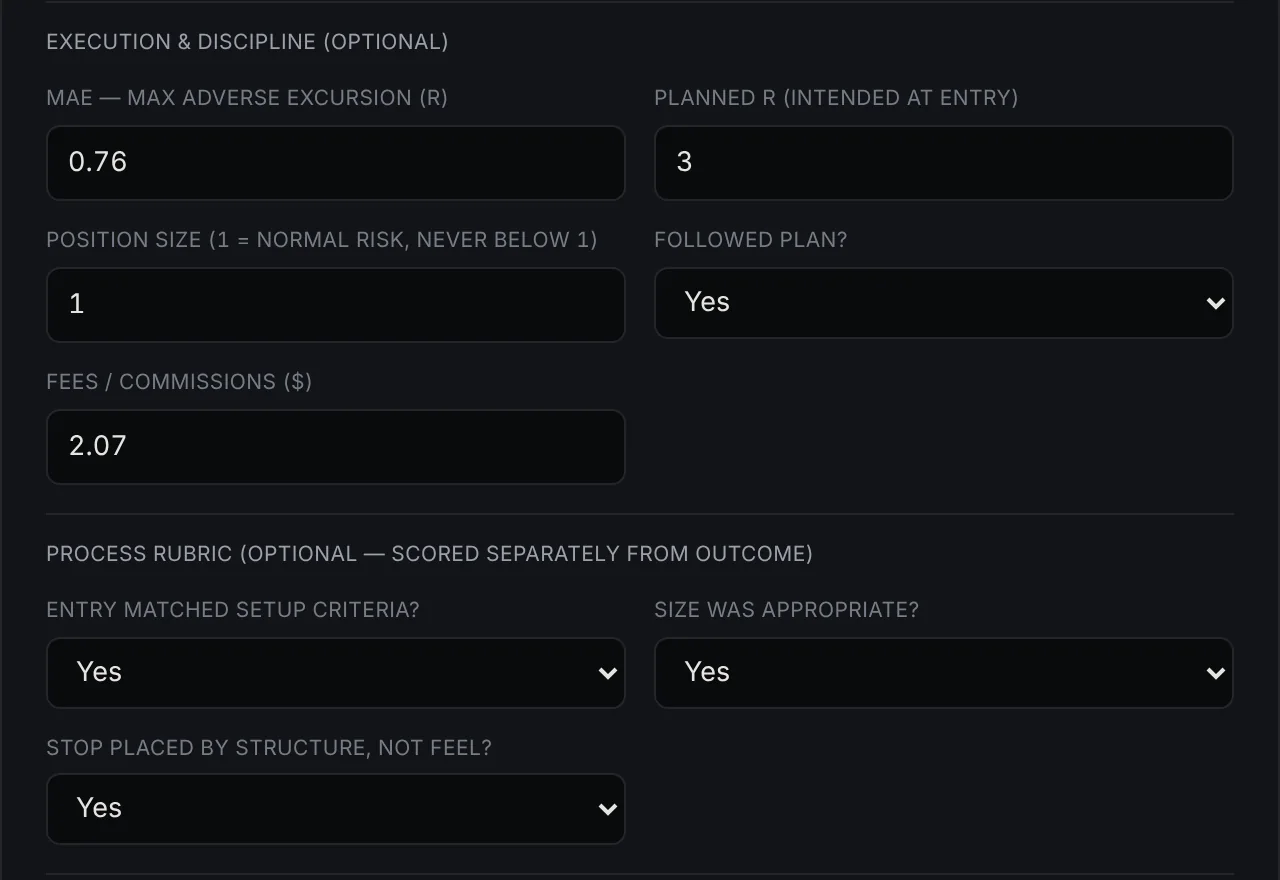
My stop goes to breakeven at 1R, a rule I explain in Breakeven At 1R. If the stop was moved, I log where it actually was. I also log the furthest the trade went in my favour before it closed, in R. That number matters later, because it is what the exit simulator uses to test other ways of taking profit.
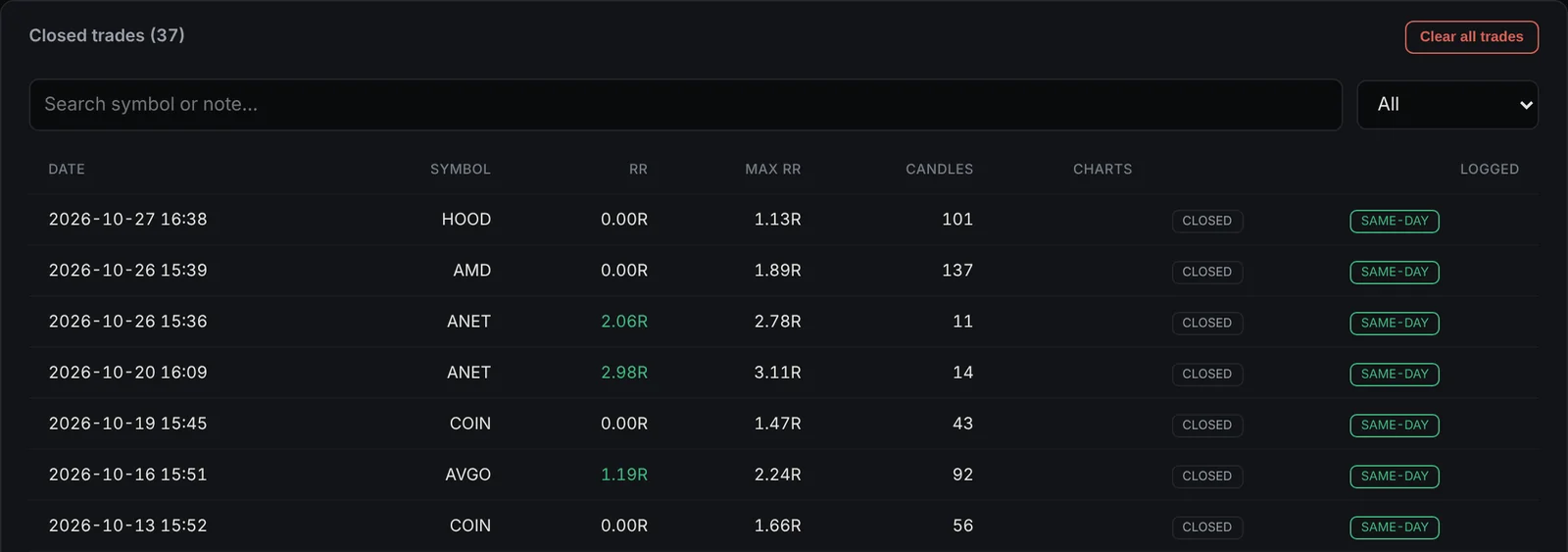
When the trade closes I add the result in R or in dollars, and the tool works out the other. Every trade is stamped with the real time it was saved, and that stamp can't be edited. The log shows whether each trade was entered the same day, within a week or backfilled later, and any trade I change afterwards is marked as edited.
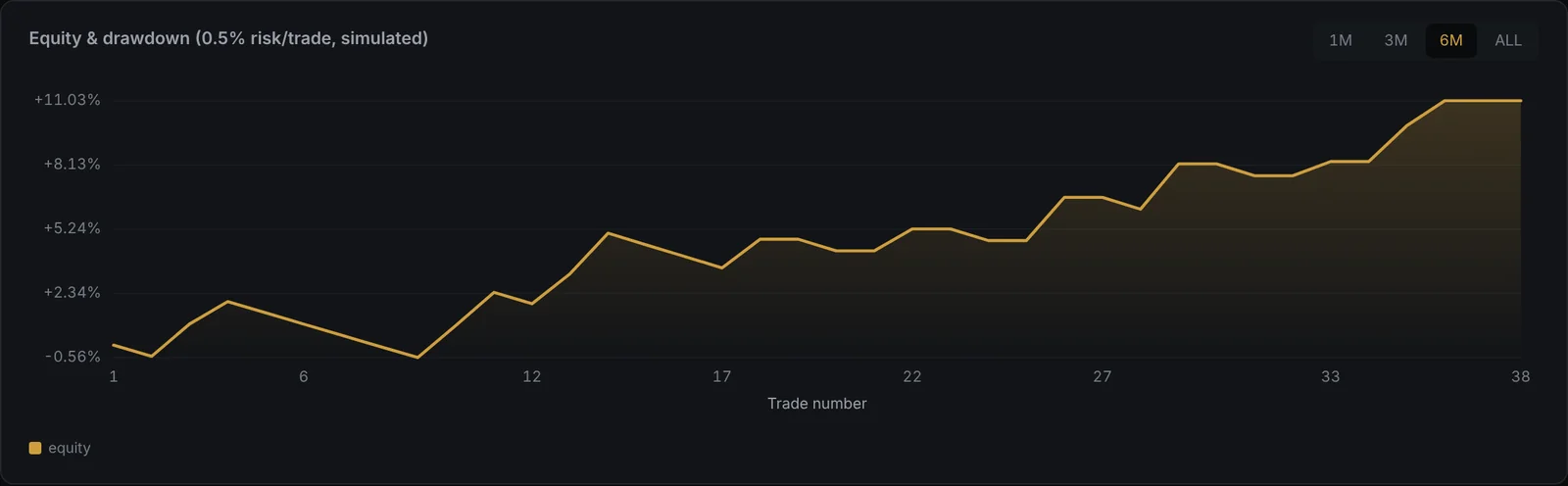
One trade is noise. Forty start to describe a system. The tool tracks the equity curve and the drawdown, a desk score, and a risk profile across five areas: consistency, risk-adjusted return, tail risk, edge and capacity, and the track record itself. It also breaks results down by setup, entry timeframe, hour of entry, day of week and market regime, so I can see where the edge comes from and where it leaks.
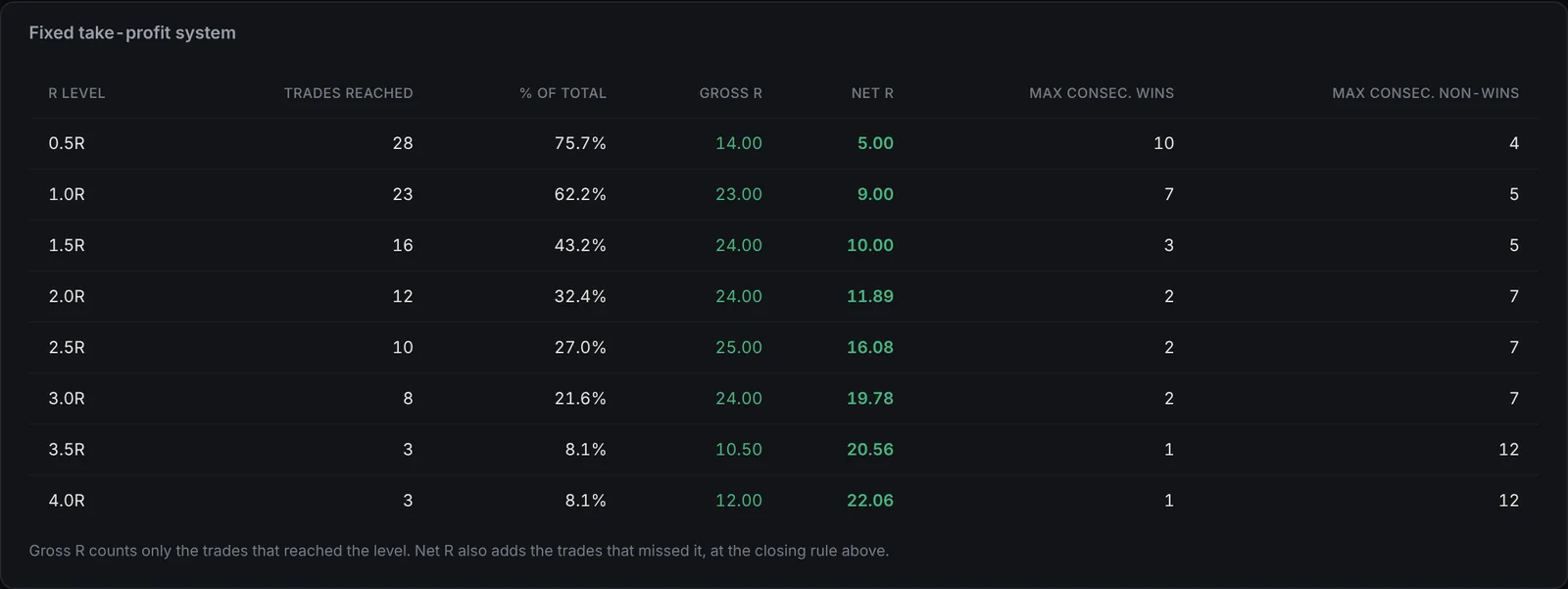
When I am tempted to change how I take profit, I test it on my own history first. The exit simulator replays every trade with a fixed target or a partial exit and shows what the record would have looked like. It ignores slippage and costs, so I treat it as a starting point, not an answer. It still beats deciding from my last three trades.
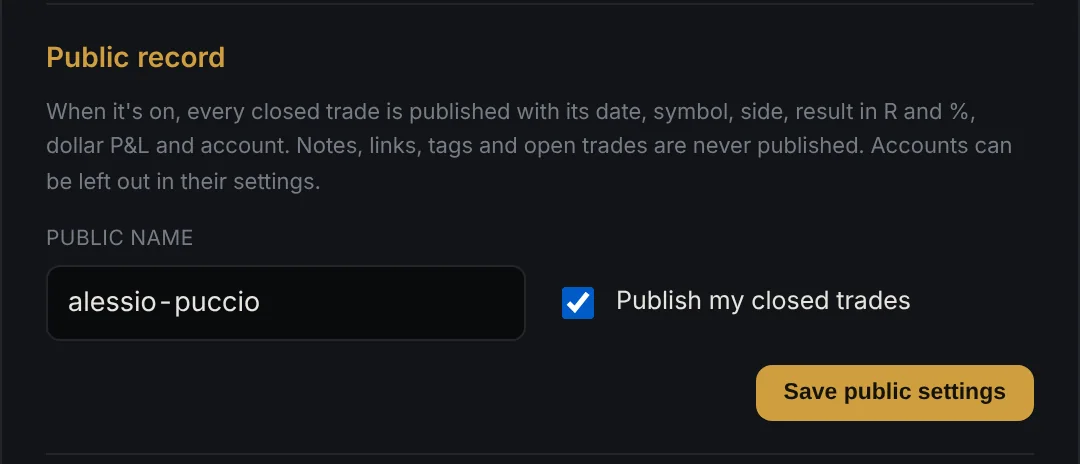
When a trade closes, it goes to the public record on this site with its date, symbol, side, result in R and percent, and dollar P&L. I don't copy anything by hand, so there is nothing to pick and choose.
Right now The Terminal View is only for my own trading. I may open it to other traders in the future, but I haven't decided when or how, and I would rather say that plainly than promise a date.
If you would want to use something like this, I'd like to hear from you. It helps me decide whether it's worth opening up. Get in touch.
My trading journal and track-record terminal. Every trade goes in with its plan, risk and result, and comes out as a score an allocator could read in thirty seconds. Explore the demo accounts below.
5 pillars, 17 metrics. Click a pillar to see what it measures.
| Date | Symbol | Side | Setup | TF | Process | Mistake | R |
|---|
Each demo trade has a recorded maximum favourable move. Trades that reached the target close at it; the rest keep their real result.
Example evaluation rules on a $25,000 account at 0.5% risk per trade ($125 per R). The real tool stores each firm's own limits per account.
| From | Trough | Depth | Trades | Status |
|---|
| Date | Symbol | Setup | Mistake | R |
|---|
Demo trade, simulated to show how The Terminal View records each trade.
Inside The Terminal
Everything I need to review, size and report a trade sits in one place, for every account I trade.
Performance by setup, entry timeframe, hour of entry, day of week, market regime and conviction level.
Risk by symbol, open trades and prop-firm limits, so a challenge rule never gets broken by accident.
Weekly review, benchmark comparison, the five deepest drawdowns and the worst trades by R.
Test fixed take-profits and partial exits against the real trade history before changing the rules.
A daily journal with mistake tags, and a running total of what each mistake has cost in R.
A size calculator that checks the risk and whether the stock can absorb the position.
Red flags and integrity checks that make the track record harder to fool, including by me.
Equity and multi-asset evaluations side by side, each with its own balance, limits and score.
Every new trade becomes a ready-to-post summary, so the public record stays in sync.
Follow The Record
Effort vs. Result, every Saturday, is built straight from The Terminal View: daily R, trades taken and rule breaks.
Studies, monthly letters and case files behind the way I trade. The work I'd want to see from anyone before trusting them with capital.
Written notes on the method, risk and the record. Quicker to read than the videos, and written to be checked rather than believed.
Moving the stop to breakeven isn't free protection. It's a trade-off, and it has to fit your system. This is mine.
The written version of Cause & Effect No. 4. Watch it on YouTube.
Every time the stop moves to the entry, you give something up to get something back. Move it too late and it doesn't protect you. Move it too early and a normal pullback takes you out right before the move. That's why there's no universal breakeven rule. You can't copy mine and expect it to work on a different system.
When price reaches 1R in my favour, I move the stop to breakeven.
From there the trade is risk-free. If it never reaches 1R, I accept the 1R loss I planned for.
It works for me because I'm a momentum trader with tight stops. When a trade is right, price usually reaches 1R within one or two candles, and once it's there it rarely comes back to the entry. If it chops around the entry, the strength isn't there and I'd rather be out. A trade that reaches 1R, comes back to breakeven and then runs happens maybe one or two times in ten.
The exceptions. If price isn't moving the way it should, I can move to breakeven before 1R or close the trade manually at breakeven.
When it doesn't apply. A 1:1 system can't really use breakeven, because the target and the breakeven point are too close. The rule makes sense for asymmetric systems where the upside is many times the risk. A mean-reversion trader might move to breakeven after a break of structure instead, at 0.5R or at 2R. It depends on the system.
Neither matters if the rule works for your system most of the time. If it does its job 80 times out of 100, the other 20 are part of the cost.
These are nine trades from September, before my official record began in October. I was still testing, and the data for them isn't complete enough to go in my journal, so they're kept separate. They still show what the rule does.
| Outcome | Trades |
|---|---|
| Breakeven | 6 |
| Winner, with a partial exit | 1 |
| Loss | 2 |
| Net result | +1.5R |
Two more losses instead of breakevens and the month would have been negative. Breakeven decided the month.
The last breakeven only reached 0.2R. It was one of the exceptions: price was chopping with no strength, so I moved the stop early. It came back to the entry and then kept falling. The early move saved a full loss.
GILD, 20 October. An A+ setup. It reached 1R, I moved to breakeven, price came back and closed the trade at zero. It would have ended as a loss. The price wasn't ready.
PLTR, 21 October. I moved to breakeven almost immediately. Price took off, then built a large re-accumulation while I was around 6 to 7R in profit. Because the worst case was breakeven, I held without worrying. The biggest part of the move came in the last 30 minutes of the session.
Breakeven costs you some winners. In exchange, it gives you the freedom to hold the big ones, the 1:18, 1:20 and 1:30 trades my system depends on. For almost any system, if breakeven stops fear from interfering with your execution, it's worth having.
Streaks aren't bad luck. They're arithmetic, and the size you trade decides whether you survive them.
The written version of Cause & Effect No. 3. Watch it on YouTube.
For my first two or three years I thought a good trader had to be right on almost every trade. Anything under 85 to 90% felt like failure. So every time a system gave me three or four losses in a row, I decided it didn't work and changed it.
That was the mistake. There is no 100% win rate, and you don't need one. With the right risk-reward, a 20% win rate can be very profitable. Losses aren't a flaw in the system. They're its business expense.
A losing trade is usually the same trade as a winner. Same pattern, same entry, same stop. You can't know in advance which one you're in.
So if you take three losses and skip the fourth because “something is wrong”, you might skip the winner that pays for all of them. The outcome of one trade is random. The edge only shows over many trades.
My first job was selling energy contracts door to door. In training they gave us a sheet with 100 boxes. If you made the presentation properly, about 3 people out of 100 would sign. Every “no” was a box crossed off, and one box closer to a “yes”. A system with an edge works the same way: every loss is one step closer to the winner. You just don't know which box it's in.
Based on 40,000 simulated runs of 100 trades each:
| Win rate | Typical longest losing streak | About 1 run in 10 |
|---|---|---|
| 50% | 6 in a row | 9 or more |
| 40% | 8 in a row | 11 or more |
| 30% | 11 in a row | 15 or more |
Even a coin-flip system will give you six losses in a row in a normal run of 100 trades. My own win rate is around 20 to 30%, so 11 losses in a row is normal for me. If you don't know these numbers, a normal streak looks like a broken system, and that's when people start changing things that were working.
The same 11-loss streak, at three different risk sizes:
| Risk per trade | Drawdown after 11 losses |
|---|---|
| 0.25% | −2.7% |
| 1% | −10.5% |
| 2% | −19.9% |
The streak is the same. The damage isn't. If it's your own money and you accept a 20% drawdown, that's your choice. But if you want to manage capital one day, for a prop firm, a fund or a family office, drawdown is one of the first numbers anyone looks at. Protecting capital comes first.
The deeper the drawdown, the harder the climb:
| Drawdown | Gain needed to recover |
|---|---|
| −5% | +5.3% |
| −10% | +11.1% |
| −20% | +25% |
| −30% | +42.9% |
| −50% | +100% |
Recovering 5.3% is ordinary. Recovering 100% is a different career.
Before changing anything, ask:
Only if all three point to a real problem should you change something. Changing a system after two or three losses because you need to be right is an ego problem, not a system problem. You can be wrong and still make money.
Nothing different. Same size, same setup, same stops, no revenge trades. If the streak is normal for my win rate, there's nothing to review. It will end, and the edge will show again.
Every trade is posted on X when I take it, losses included. The Tape covers every session, and The Ticker reports the deepest drawdown and the longest losing streak of the month.
Losing streaks will come. Behave exactly as you did before the streak, and size your risk so the streak can't hurt you. It doesn't have to be 0.25%, but it has to be small enough to survive the streak your win rate guarantees.
A dollar result tells you how much. R tells you how well.
The written version of Cause & Effect No. 2. Watch it on YouTube.
A $1,000 gain on a $1,000,000 account is 0.1%. The same $1,000 on a $10,000 account is 10%. Same number, two completely different results.
That's why I measure everything in R. R stays the same as the account grows, so the numbers stay comparable: the possible drawdown, the maximum drawdown, the average winner. There is no interpretation in it. An R is an R.
1R is what you lose if your stop gets hit.
You have an entry price and a stop price, and the distance between them is your risk.
I risk 0.25% of the account on every trade. On a $25,000 account that's $62.50. On $100,000 it's $250. Before I enter, I already know the exact amount I lose if I'm wrong, and I've already accepted it. That changes how you sit in a trade. Entering with a predetermined risk is a different experience from entering and hoping.
The R decides the size, not the other way round. You need four things: the capital, the percentage you're willing to risk, the entry price and the stop price. From those you get the number of shares or lots. I use a tool I built for myself, but plenty of position-size calculators do the same job.
The point isn't the calculation. It's doing the same thing on every trade. Same process, same risk, every time. Consistency starts there.
| $10,000 account | $1,000,000 account | |
|---|---|---|
| Risk per trade (0.25%) | $25 | $2,500 |
| A 2R winner | $50 | $5,000 |
The dollar amounts change by a factor of 100. The trade is exactly the same: −1R if it fails, +2R if it works.
If every loss is 1R and every winner is a multiple of R, then one losing trade can never cost more than one winning trade earned. The only exception is a 1:1 system, where they're equal.
So when you see a trading dashboard showing +$1,000 one day and −$3,000 the next, with the same number of trades, the risk isn't consistent. That's one of the fastest ways to tell a trader who manages risk from one who doesn't.
This is where everything above leads. Expectancy is what each trade is worth on average, in R:
I lose more often than I win, and the system still makes 0.40R per trade on average, because the winners are multiples of the losers. You can only calculate this if you think in R.
None of these rules would be possible without R.
R only works if the stop is real.
Everything I publish is tracked in R: The Tape after each session, Effort vs. Result every week, The Ticker every month, and the full reports on the Track Record page. You'll see the dollar amounts too, but the R is what counts.
Size everything before it happens. Once the plan is set, there's nothing to decide in the trade, and a stop that gets hit is just part of the plan.
R makes every trade comparable, every loss planned and every edge measurable.
Price does not move at random. It moves because of an imbalance, and Wyckoff reduced that imbalance to three laws. They tell me which way, how far, and whether to believe what I see.
Richard D. Wyckoff was born in New York in 1873 and started on Wall Street at fifteen, as a runner who read the tape every day. He watched the large operators of his time, the same era as Morgan and Livermore, and wrote down how they moved prices. In 1907 he founded a market magazine called The Ticker, which later became The Magazine of Wall Street. That's where the name of my monthly letter comes from.
He was not a theorist. He described what he saw, and a century later the method still works because markets are still people buying and selling.
Price rises when demand exceeds supply, and falls when supply exceeds demand.
Every chart is in one of three states. Demand in control: buyers absorb everything offered and price is pushed higher, the markup. Supply in control: sellers overwhelm the bids and price is pushed lower, the markdown. And balance, where neither side wins and price moves sideways in a trading range. Most of the time it's the third one.
I can't see the orders. Nobody can. What I can see is the evidence they leave: the spread of each bar and where it closed, the volume it took to print it, and how that compares with the swings before it. Is the buying getting stronger or weaker than last time? That comparison is most of the job.
Before a market can trend, it has to build a cause. The range is the cause, the trend is the effect.
Inside the range, large operators are either building a position or unloading one. If strong hands are absorbing supply, it's accumulation, and the effect is an advance. If they're selling into demand, it's distribution, and the effect is a decline. The longer and more significant the range, the larger the move that can follow. A short range rarely produces a big trend.
Wyckoff estimated the size of the effect from the width of the range with a point and figure count. I treat it the way he meant it: as an estimate of potential, not a target. Price still has to prove it.
Volume is the effort. Price movement is the result. They should agree.
The box that matters most is the second one. When volume reaches the highest levels of the move but price barely progresses, the buying is being met by supply. That's where trends stall and turn. It's a warning, not a signal on its own, so I wait for confirmation before acting on it. It's also the name of my weekly review, because the same test applies to my own work: how much effort went in, and what result came out.
The laws aren't three separate tools. They're one sequence, and I run it down the cascade: the 6W sets the bias, the W the context, the D the tradable pause, the 65m the momentum, the 6m the pattern within the pattern, and the 1m the entry. Price and volume make the decision. The moving averages only mark where price pauses.
I made all four. The fix was the same every time: slow down and make the chart show me the evidence before I give it a name.
Direction, distance, validity. Three questions, asked in that order, every time. That's the whole method.
Two systems with a positive edge on paper. One wins 60% of the time at 1:1, the other wins 20% of the time at 1:7. On a spreadsheet both make money. In live trading, only one survives.
Most traders pick the first system without thinking. Winning six trades out of ten feels good, and losing eight out of ten feels like failure. But the expectancy, what each trade is worth on average in R, tells a different story.
Live trading takes a little off every trade: slippage on the entry, a stop that fills worse than planned, a target you leave a bit early, commissions. Call it execution decay, measured in R. It costs both systems the same amount per trade, but it doesn't hurt them the same way.
With no decay, A makes +0.20R a trade and B makes +0.60R. Push the slider to 0.20R, a realistic number for a 1:1 system traded on short timeframes, and A's edge is gone. B still makes +0.40R a trade. A has no room for error, because its wins and losses are the same size: every bit of friction comes straight out of a small edge. B's wins are so large that the same friction barely moves the result.
System B isn't comfortable. Look at the runs: long flat stretches, strings of eight, ten, twelve losses in a row, and drawdowns that would make most people abandon it right before the next 7R winner. The edge is real, but you only collect it if you keep taking the trades.
That's why I measure process, not just P&L. On a low win-rate approach, the losing streaks are part of the plan, and the only question that matters on a red day is whether I followed the rules.
A high win rate feels like an edge. Expectancy after costs is the edge. If it doesn't survive execution, it was never there.
This is an illustrative model, not a backtest of a real strategy. Decay is modelled as a fixed amount taken from every win and added to every loss.
Ideas from the way I trade, tested with data. The laws behind the method, the numbers behind win rate, risk-reward, losing streaks and breakeven stops, and what live execution does to an edge.
Direction, distance and validity. The three questions I ask every chart before I risk a dollar, and why every series on the channel is named after them.
Every week the Cause & Effect videos go further on YouTube, alongside the session recaps and the weekly briefings.
Visit The YouTube Channel →One example of my setup in every episode: the pause after an impulse, read top down from the 6W to the 1m. Any market, any period. What I look for inside the pause, and the logic behind it.
Session recaps, weekly briefings and the Cause & Effect studies are on the YouTube channel.
Visit The YouTube Channel →The Composite Man case files are illustrative examples of the setup, chosen to show how it reads. They are not a performance record. Results are on the Track Record page.
A monthly report on the record, on the first weekend of every month: monthly R, the equity curve, max drawdown, the rule breaks and what changes next. Named after the magazine Richard Wyckoff founded in 1907.
Each letter reports the month on the record. The full monthly figures and report PDFs are on the Track Record page.
Real-time results, reported monthly in the format funds use. The record starts on prop-firm evaluation accounts, which use simulated capital, and every month is labeled by stage. Terminal View demo data never appears on this page.
Track Record
The record started in October 2026 on prop-firm evaluation accounts for US equities and for indices, metals and commodities. They run in real time on simulated capital. The funded record begins when each evaluation is passed and is reported separately. Monthly returns are published here as each month closes, net of commissions and fees.
Trade Log · Live
Published automatically from The Terminal View when each trade closes, with its result in R, in % and in dollars. Open trades appear once they close.
Evaluation accounts run in real time on simulated capital, so their dollar amounts are simulated. Results are net of commissions as recorded in the journal.
Key Statistics
The record began in October 2026 on evaluation accounts. Figures appear here once that month closes.
Monthly Returns
Empty cells are months before the record begins or not yet closed.
Reports
The complete report for every month, quarter and year, plus each week. Nothing is removed. A corrected report is published as a new version, with a note on what changed.
Reports marked E come from prop-firm evaluation accounts on simulated capital. Reports marked F come from funded accounts.
Verification
Every figure on this page can be traced to a source outside this website.
Every trade is posted on X at the moment it is taken, with a timestamp that cannot be edited after the fact.
@Wyckoff_Trader_ on X →Monthly statements from the evaluation provider behind every reported return, available to allocators and prop desks on request. Broker statements follow once real capital is traded.
Request on LinkedIn →Results of the equity and multi-asset evaluation programs, published with the program's own confirmation once each one is completed.
Third-party verification of the full record once it covers enough months to be meaningful.
Methodology
Profile
Alessio Puccio is an independent day trader based in Venaria Reale, near Turin. He has studied the markets since 2017 and has worked on them full time since 2021. In 2022 he defined his current strategy, built on the Wyckoff method and read across six timeframes, from the six-week chart down to the one-minute. Price and volume lead the read, the 5, 10, 20 and 50-period moving averages mark where price pauses, and no fundamental analysis is used.
He trades liquid US equities, plus indices, metals and commodities, and is completing funded evaluations on both. Every trade is posted on X when it happens, and every trade is logged and scored in The Terminal View, the journal and track-record system he built.
His objective is The Island Partner, a trading desk run on the same process. He has no finance degree and does not treat one as a requirement. The record is meant to make that case.
Timeline
Ichimoku, supply and demand, support and resistance, pitchforks, Elliott waves and harmonic patterns.
Study and practice become the only focus.
Built on the Wyckoff method: one setup, the pause after an impulse, read across six timeframes.
Prop-firm evaluations on US equities and on indices, metals and commodities, every trade published and logged in The Terminal View.
The United States Investing Championship, as public proof of the approach.
A trading desk run on one repeatable read of supply and demand.
What this site collects, why, and what you can ask me to do with it.
This site is run by Alessio Puccio, The Wyckoff Trader, based in Italy. I am the data controller for the personal data described below. You can reach me through the channels on the contact section.
Messages you send me. If you contact me on LinkedIn, X, Instagram, YouTube or by email, I use what you send only to reply. Those platforms process your data under their own privacy policies.
Nothing else. The site has no sign-up forms, no account system and no advertising. The Terminal View demo uses simulated data and stores nothing about you.
The trade log on the Track Record page and the latest trades on the home page are loaded from Supabase, the database behind The Terminal View, hosted in the EU. To show them, your browser connects to Supabase's servers, which receive your IP address and browser details. No cookies are set and nothing about you is stored.
This site is hosted by Cloudflare, Inc. To deliver the pages and protect the site against attacks, Cloudflare processes technical data such as your IP address and browser details on my behalf. This processing is covered by Cloudflare's data processing terms, and the data is not used to profile you.
This site does not set cookies and does not use analytics or advertising trackers, so there is no cookie banner. If that changes, for example if I add analytics, this page will be updated and you'll be asked for consent before any non-essential cookie is set.
Fonts are loaded from Google Fonts, which means your browser connects to Google's servers and shares your IP address with them when the page loads. The site does not use Cloudflare analytics or any other analytics service.
The Composite Man and The Ticker videos are played through YouTube in its privacy-enhanced mode. Nothing loads from YouTube until you press play. Once you do, Google receives your IP address and may set cookies under its own privacy policy.
Messages are kept as long as the conversation is relevant.
Under the GDPR you can ask to access, correct or delete your data, restrict or object to its use, and receive it in a portable format. You can also complain to the Italian data protection authority, the Garante per la protezione dei dati personali (garanteprivacy.it).
Everything on this site is educational. Nothing here is a recommendation to buy or sell any security. Trading involves substantial risk of loss, and past or simulated results do not guarantee future results.